

By Zakir, Aug 31, 2026
← Previous | SEO Series | Next →
Website-Level SEO Part 4 of 5
Step 4: URL Mapping
Introduction
A website without a plan is like a ship without radar. Even if you have done excellent keyword research and created valuable content, you still need to know where each keyword should lead.
That is why URL mapping is so important. It gives you a clear roadmap for your website by connecting keywords with the most appropriate pages. It helps search engines and visitors understand which page is intended to serve a particular topic or search intent.
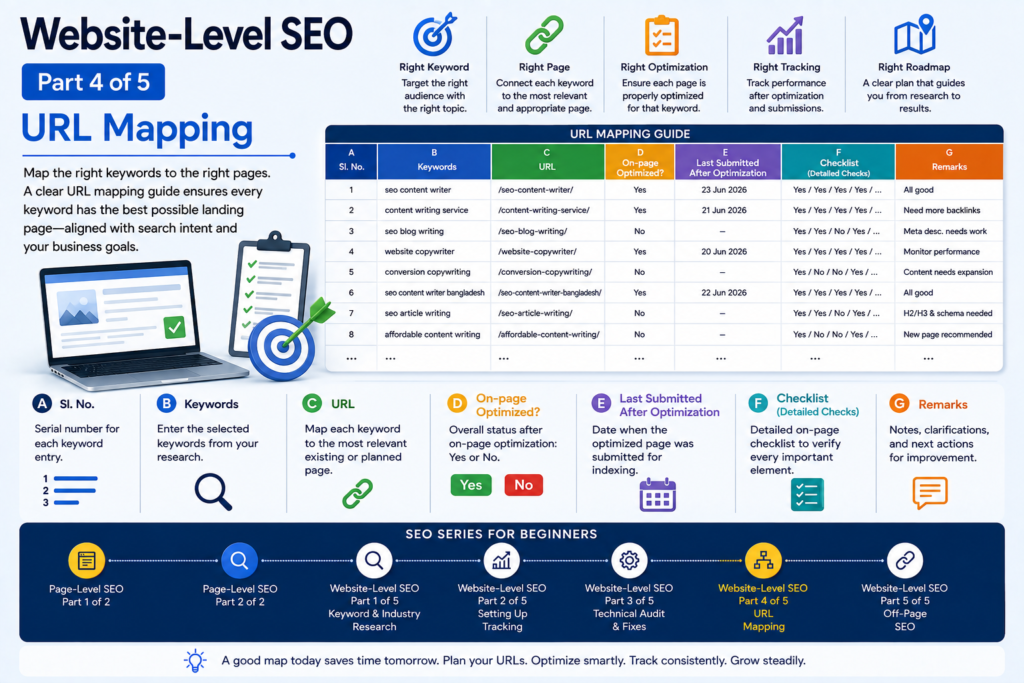
URL mapping is the process of deciding which page of a website should target which keyword or group of closely related keywords. After completing Keyword and Industry Research, we place the selected keywords into a Google Sheet or Excel worksheet and map each keyword to the most appropriate URL. The purpose is simple. One keyword should have an appropriate place to land.
Sometimes several closely related keywords can naturally land on the same page when they have sufficiently similar search intent. In other cases, a completely new page may be required.
To organize this process, we can create a basic URL Mapping Guide in a Google Spreadsheet.
A basic URL Mapping Guide can contain these seven columns:
| Sl No. | Keywords | URL | On-page Optimized | Checklist | Remarks |
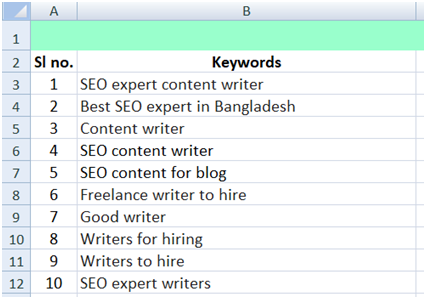
Column A: Sl. No. Write the serial number of each keyword entry.
Column B: Keywords. Enter the keywords selected during the Keyword and Industry Research stage.
Column C: URL. Several closely related keywords may eventually be assigned to the same URL when they have sufficiently similar search intent and can be satisfied naturally by the same page. This is important because keyword research does not mean that every keyword needs its own page.
Image of Column A & B:
Column C: URL. Several closely related keywords may eventually be assigned to the same URL when they have sufficiently similar search intent and can be satisfied naturally by the same page. This is important because keyword research does not mean that every keyword needs its own page.
This is one of the most important columns because this is where we identify the exact page that should be considered the landing page for the targeted keyword. That means this is the page where your targeted keyword should appear.
The image for column C:

If Google is already associating a keyword with an existing page on the website, we can consider using that URL.
If the website is new, or Google has not yet established a preferred page, we need to examine the website’s structure and choose the page that is the most logical match for the searcher’s intent and the business goal.
If no suitable page exists, we can temporarily leave the URL blank and identify the need for a new page.
This does not mean that every keyword requires its own page.
The important principle is: The keyword must have an appropriate runway — the right page must genuinely satisfy the search intent.
Column D: On-page Optimized?
The image of Column D:
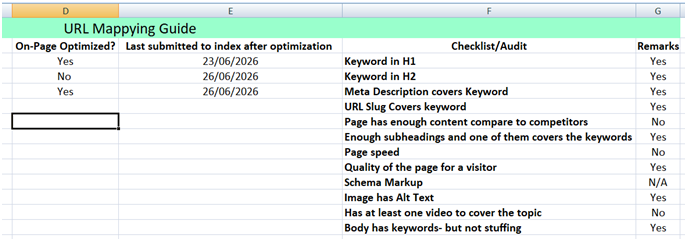
This column records the overall status of the page’s on-page optimization for the mapped keyword.
Because the column asks, “On-page Optimized?” the simplest answers are: Yes or No.
Use Yes when the relevant on-page checks have been completed satisfactorily. Use No when the page still requires on-page optimization.
A Yes should not mean that the keyword has merely been inserted somewhere on the page. It means that the page has been reviewed against the relevant on-page requirements and the necessary work has been completed satisfactorily.
Column E: Last Submitted After Optimization
The Image of Column E:
Record the date on which the optimized page was submitted for indexing after the relevant changes were completed.
For example: 23 June 2026
Keeping this date is useful because later we can compare the optimization date with changes in the page’s search performance. This gives us a useful timeline: Optimization → Submission → Measurement → Improvement
Column F: The Checklist
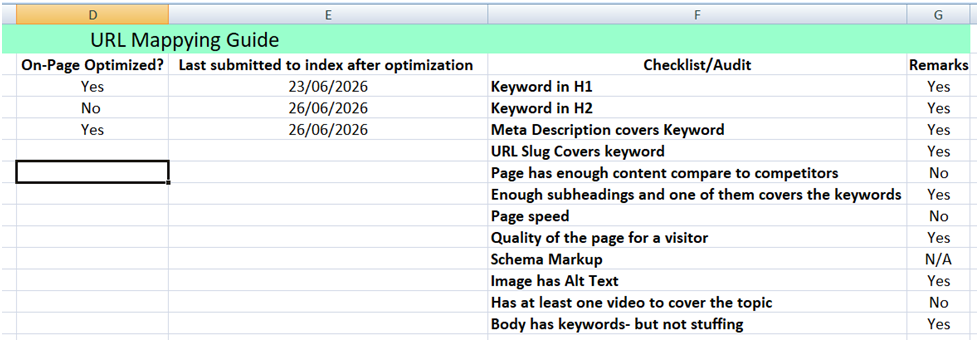
This column contains the detailed questions used to verify the page.
The checklist may include:
1. Is the keyword appropriately represented in the title?
2. Is the keyword or an appropriate variation represented in the H1?
3. Is the keyword or a relevant variation used naturally in suitable H2/H3 headings?
4. Does the Meta description accurately cover the topic?
5. Does the URL slug appropriately represent the page?
6. Does the page provide sufficient and useful content for the search intent?
7. Is the page competitive in quality compared with relevant ranking pages?
8. Is the page speed acceptable?
9. Is the page useful and satisfying for the visitor?
10. Is appropriate schema present where relevant?
11. Do important images have appropriate alt text?
12. Is relevant video or other useful media present where appropriate?
13. Is the keyword or topic used naturally without keyword stuffing?
These checks should be evaluated individually. For each applicable check, record the result, such as:
Yes / No / “N/A” or “Not applicable” can be used when a particular element does not make sense for that page.
Column G: Remarks
Please look at the above image of column F.
Use this column to explain anything that needs attention, clarification, or further action.
For example:
Title optimized/ Meta description needs revision/ No existing suitable URL/
New service page required/ Schema not applicable to this page/ Content needs expansion after competitor review/
This makes the spreadsheet useful not only for recording status but also for understanding what should happen next.
How the Columns Work Together:
The most important idea is that Column D is the summary status, while Column F explains why that status is Yes or No.
Therefore:
Column D = Overall status
Column F = Detailed checklist
Column G = Explanation or next action
For example, if Column D says “No”, the checklist may show that the title and H1 are optimized, but the Meta description and content still need attention. Column G can then explain exactly what needs to be done.
This makes the URL Mapping Guide more than a list of keywords. It becomes a working system for managing the SEO work.
Is SEO Finished When the Column D Says “Yes”?
No.
A Yes means that the relevant on-page work has been satisfactorily completed at that point. It does not mean that SEO for the page is permanently finished.
SEO is an ongoing process. Search results change. Competitors improve their pages. New content is published. Search intent can evolve. Business priorities can also change. Therefore, a page may need further review and improvement later.
The Complete URL Mapping Guide
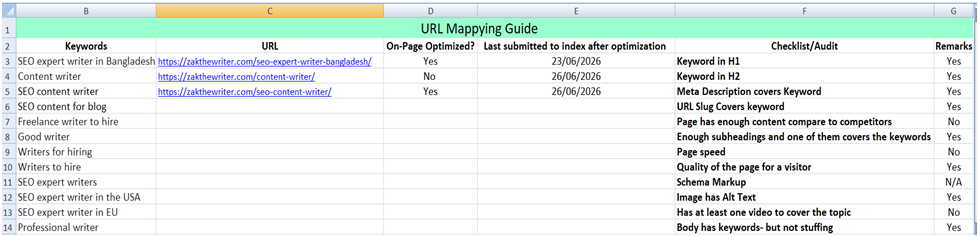
The purpose of the URL Mapping Guide is not merely to create a spreadsheet.
It creates a working system that helps us understand:
Which keyword are we targeting?
Which page should rank for it?
Has that page been optimized?
What exactly was checked?
What still needs attention?
When was the optimization submitted?
This gives us a clear runway from keyword research to page optimization and, eventually, to measurement.
It also gives both the SEO professional and the client a practical overview of the work being done on the website, the problems that have been identified, the solutions that have been implemented, and the actions that still need to be taken.
In simple terms, URL mapping helps turn keyword research into an organized SEO plan.
The keyword is the destination.
The URL is the runway.
The checklist is the inspection.
The remarks tell us what needs to happen next.
And the complete URL mapping guide gives us the roadmap for moving from research to implementation and measurement.